Skip to content
iCon-L.NOVA

35years of iCon-LWith NOVA we are opening a new chapter.

Draw. Test. Observe in operation. iCon-L.NOVA

iCon-L.NOVA is the thorough modernisation of iCon-L, the graphical programming system for controllers. You draw the function of your machine as a block diagram, test it in the simulator and see every value in live operation, right where it arises.

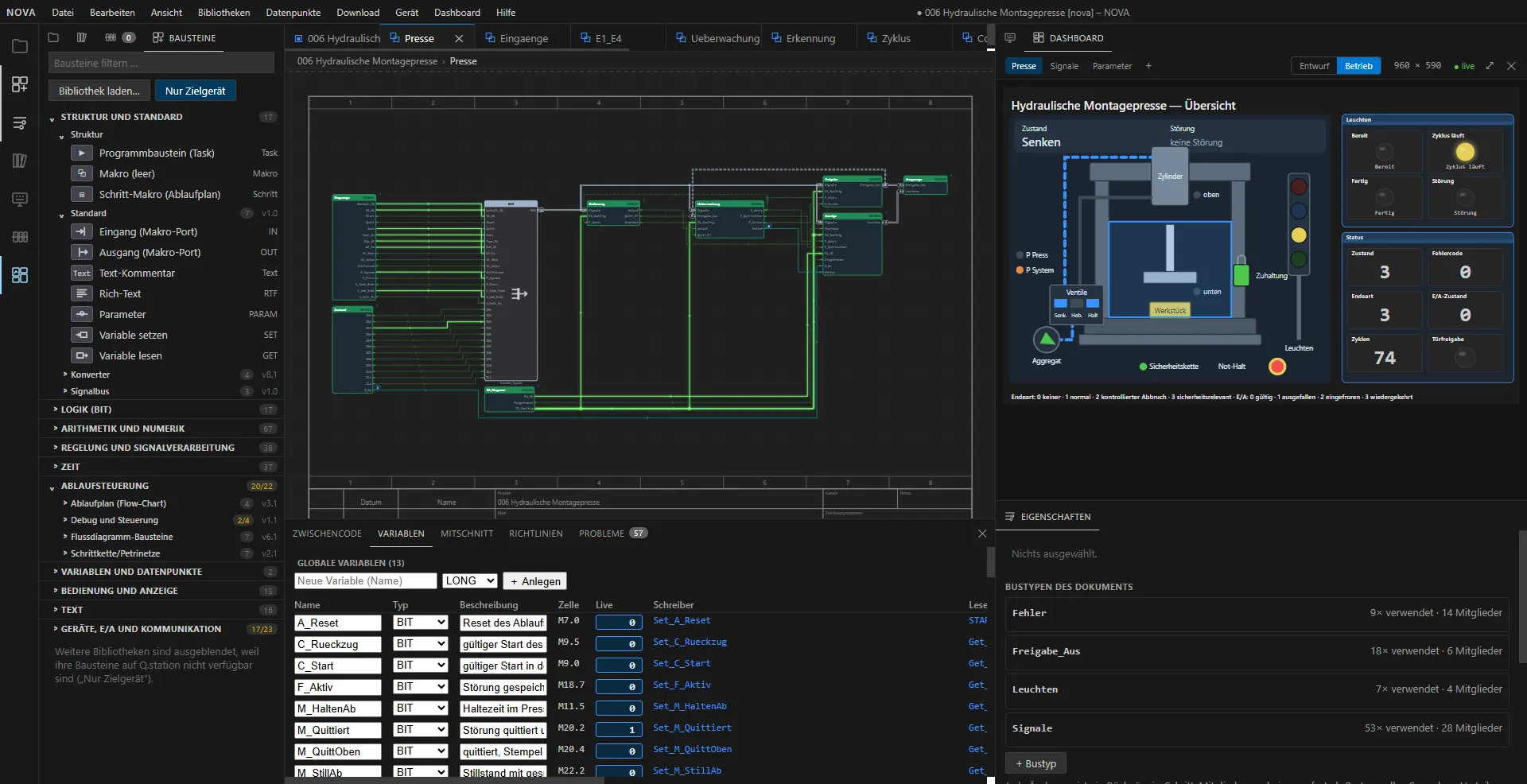
The iCon-L.NOVA development environment in operation: block palette on the left, the block diagram of a hydraulic assembly press with glowing signal lines in the centre, the dashboard with a graphic of the press on the right, the variable list with live values below.
The development environment in operation: block diagram of a hydraulic assembly press with live values, next to it the corresponding dashboard (captured 13 November 2026, German user interface).
bits: controllers of any size
8–64
block libraries
49
function blocks, approx.
270
tools for AI assistants
50
automated tests per change
1,254

Development status as of 13 November 2026, version 0.2.

For users

You develop machines, test benches or plants

You draw the function instead of programming it – and see in operation what your controller is doing.

  • Block diagram instead of program code
  • Test in the simulator before the hardware is available
  • Read every value in the diagram during operation
To the strengths

For device manufacturers

You build controllers

You give your customers a graphical programming system for your device. We bring it onto your controller.

  • Runtime kernel for 8 to 64 bits, ARM and Intel
  • Compatible with existing iCon-L controllers
  • Porting as a service by ProSign
To the porting service

How you work

From the block diagram to the running system.

iCon-L.NOVA is a block diagram editor that works like a modern development environment. A model always takes the same path.

  1. Draw

    Place blocks from the palette and connect them. The editor routes the signal lines itself; models can be structured into macros to any depth.

  2. Compile

    The diagram is translated into target-neutral intermediate code. Only the linker turns it into the download files for the respective device.

  3. Simulate

    The included simulator executes the compiled code just like the device does. The application can be tested before the hardware is available.

  4. Download and observe

    Download, start and stop from the device view. In operation, live values appear on the lines and parameters can be adjusted online.

Strengths

Three reasons for iCon-L.NOVA.

See what the program is doing. Test before the hardware is available. And let an AI assistant draw along.

Online debugging

The editor becomes a measuring instrument

After the download, iCon-L.NOVA shows the internal states of the program online – right where they arise: in the block diagram. Troubleshooting starts with a glance, not with a measurement setup.

  • Signal lines show their current values; logic signals that are set light up
  • Visualisation blocks directly in the diagram: gauge, LED, bar graph, number, XY display and trend curve
  • Operate switches, buttons and sliders in the diagram, write values online
  • In flow charts the currently active step is highlighted
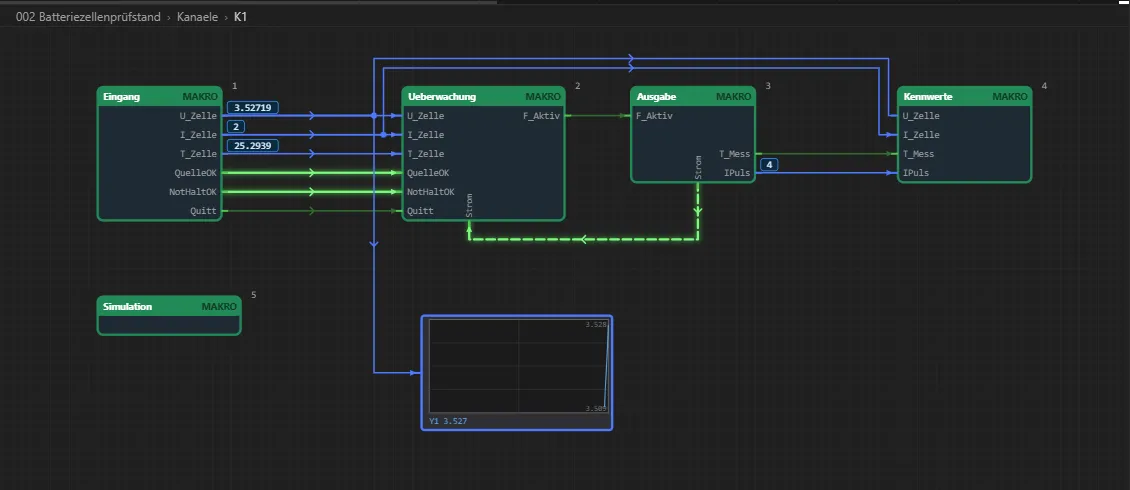
Level “K1” of a battery cell test bench in operation: macros for input, monitoring, output and characteristic values, the current values appear on the signal lines, and a trend recorder below plots the cell voltage.
Values on the lines and a trend recorder as a block in the diagram: reference channel of a battery cell test bench in operation.
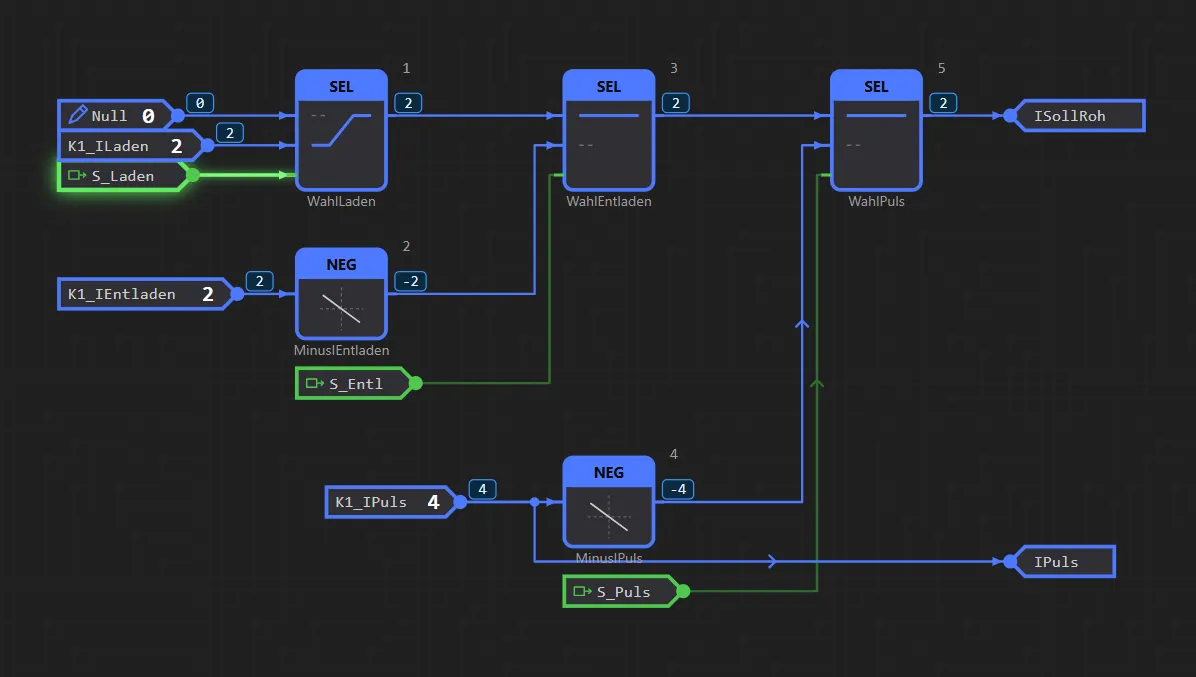
Detail of a block diagram in operation: the current value is shown at every output of the selection and negation blocks, the active control line is lit green.
In detail: every intermediate value of the setpoint calculation can be read, the active signal “S_Laden” is lit.

Simulation and test

Test before the hardware is available

The included simulator executes the same compiled code as the device. A test driver writes the inputs, reads the outputs and compares them with the test specification – on the simulator exactly as later on the real device.

  • Simulators for the Q.station and the STG-850 are included
  • A plant simulation replaces the machine or the device under test
  • Every run is logged with measurement data – from requirement to test case to test report
Excerpt from the test report of a battery cell test bench, 11 November 2026
Test caseContentResult
TF-01Initial state after download and restartpassed
TF-02Complete test sequence with two cycles, 434 spassed
TF-03Capacity and energy within ± 2 %passed
TF-04Internal resistance 82.5 mΩ against model 80.0 mΩpassed

14 of 14 test cases passed

MCP server

The AI assistant draws along

iCon-L.NOVA exposes its functions via the Model Context Protocol (MCP), an open standard for connecting AI assistants. An assistant works in the running editor – just like a user, only faster.

  • Read diagrams, place and connect blocks, create and dissolve macros
  • Set up state machines, arrange levels by signal flow, split them into function groups
  • Check drawing rules, operate simulator and device, read live values, edit dashboards

Every call is exactly one editing step that the user sees and can undo. The interface is only reachable locally on the workstation.

Examples from 50 tools

  • nova_dokument_lesenRead the diagram with levels, blocks and lines
  • nova_typenList the blocks available for the target device
  • nova_zeichenregelnCheck the drawing rules
  • nova_zwischencodeGenerate intermediate code and report warnings
  • nova_geraetConnect, download, start, stop
  • nova_live_werteRead live values from the device
  • nova_blattSet sheet size and title block
  • nova_screenshotCapture an image of the editor

Readable projects

Projects and libraries are text files in JSON format. A version control system such as Git shows every change line by line.

Existing projects come along

iCon-L.NOVA imports test.con projects of versions 4.4 to 6.2 and exports projects as a test.con backup.

Browser or Windows

iCon-L.NOVA runs in the browser or as a Windows application, in German and English, light or dark.

Examples

Two projects – from the requirements specification to the passed test.

Both applications have been built in iCon-L.NOVA and tested in the simulator against their test specification. The images on this page come from these two projects.

Sequence control

Hydraulic assembly press

The control of an automated press: lowering, pressing, lifting – with safety door, emergency stop and fault handling. The project was created largely automatically; the human decided, confirmed and released the downloads.

blocks in the project
433
test cases passed in the simulator
32/32
working time from the confirmed requirements specification to the passed test
73 min
dashboard pages: press, signals, parameters
3
  • Derived from the requirements specification: requirements, architecture and 32 test cases
  • Sequence control with signal buses – signal groups run as one trunk per macro
  • Dashboard with a press graphic: cylinder, valves, guard locking and lamps in operation
  • A plant simulation replaces the press in the test

The application has been tested in the simulator; the test on the target device is still to come.

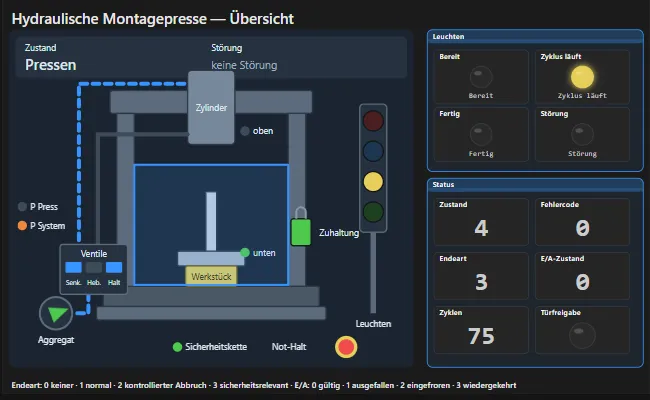
Dashboard “Hydraulic assembly press – overview”: graphic of the press with cylinder, workpiece, valves and guard locking, next to it lamps for ready, cycle running, done and fault as well as state, error code and cycle counter.
Dashboard of the assembly press in the state “Pressen” (pressing), captured 13 November 2026.

Measurement and test engineering

Battery cell test bench

The control of a test bench for battery cells. The reference channel has been built in iCon-L.NOVA and tested in the simulator.

program blocks: channels and sequences
2
test cases passed in the simulator
14/14
levels in the project printout of 114 sheets
101
global variables
23
  • Input, monitoring, output and characteristic values as macros with a visible signal flow
  • Test sequence as a state machine: charging with constant current and constant voltage, rest, discharging, pulse
  • Monitoring of voltage, current and temperature with error memory and error code
  • Dashboard with overview and channel page

The reference channel has been built and tested in the simulator; further channels and the test on the device are still to come.

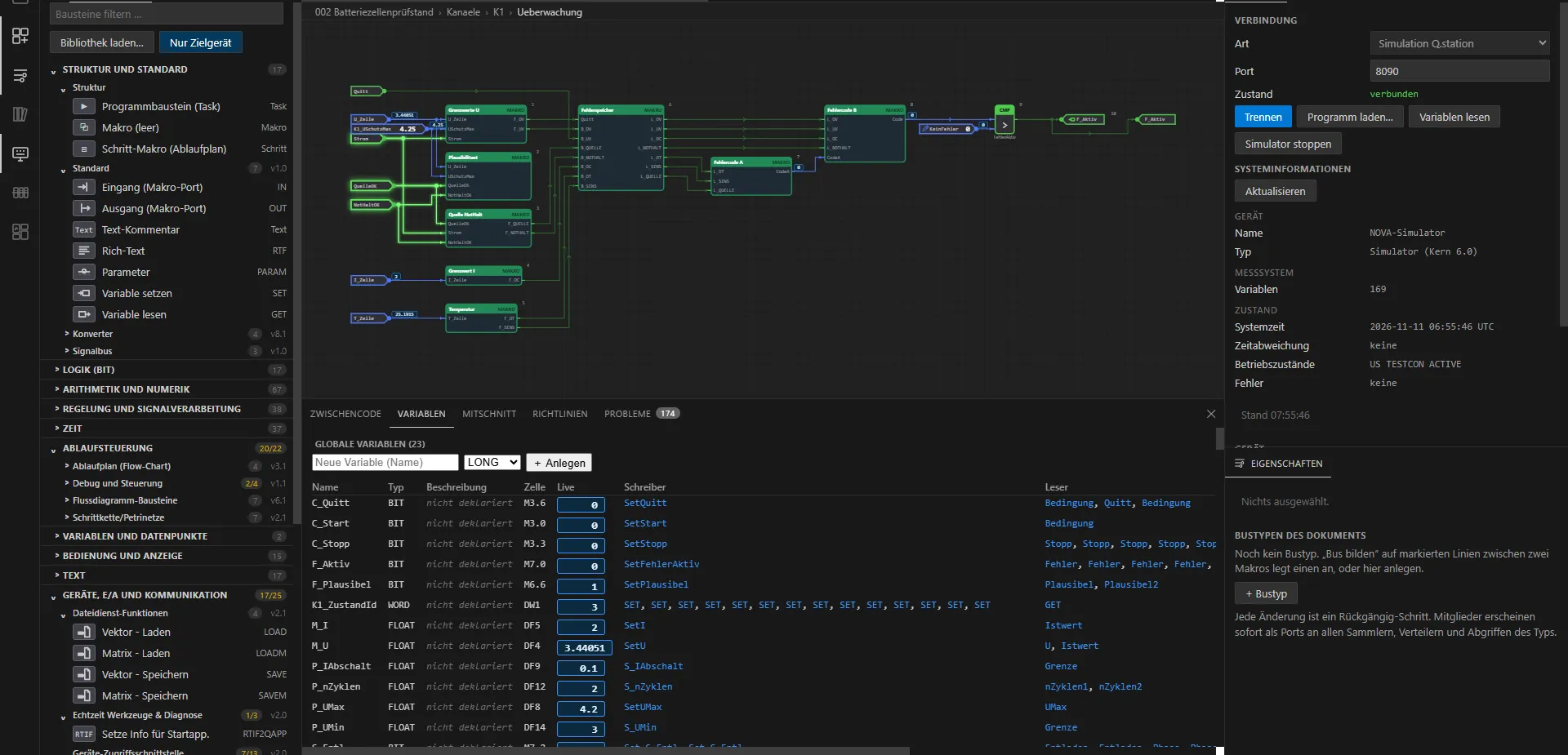
Development environment with the battery cell test bench: the level “Ueberwachung” (monitoring) with live values in the centre, the variable list below, the device view with the connection to the simulator on the right.
Monitoring of the reference channel with live values from the simulator (captured 11 November 2026).

More example projects

  • Limit monitoring

    An analogue channel is filtered and monitored against a limit with hysteresis; the alarm must be acknowledged.

  • Stress test

    Synthetic application with around 10,000 blocks to determine the limits of editor and simulator.

  • Taking over a legacy program

    A voltage regulator imported from test.con with 9,644 blocks, running in the simulator.

  • Block test

    Every function block is tested in four stages: catalogue, intermediate code, run in the simulator, function against target values.

Platform

One program – every iCon-L controller.

The iCon-L runtime kernel works underneath iCon-L.NOVA. It separates the application from the hardware – which is why the same block diagram runs on very different devices.

Highly portable runtime kernel

The runtime kernel runs on controllers with 8, 16, 32 and 64 bits – on ARM controllers as well as on Intel architectures.

Hardware-independent application

The same block diagram can be downloaded to an 8-bit controller or a 64-bit controller without any change. As a rule, only the input and output layer is tailored.

Compatible with existing controllers

iCon-L.NOVA is 100 % compatible with the existing iCon-L target systems. Even controllers that are 10 or 15 years old can still be programmed with it.

Target systems – two examples

  • BARTH Elektronik

    lococube mini PLCs, for example the STG-850

    Compact controllers of the STG series, programmed with miCon-L so far.

  • Gantner Instruments

    Q.station

    Controller for measurement and test engineering; dashboards also run directly on the device here.

Features

What else iCon-L.NOVA can do.

Sequences, user interfaces and documentation are part of the tool – no add-on product required.

Sequences

State machines and flow charts

Sequences are drawn like signal flows: as a flow chart with steps, conditions and transitions. In operation the editor shows which step is currently active.

  • Flow charts, sequential function charts and state machines from a template
  • Separate actions per state for entry, run and exit
  • The active step is highlighted in the diagram
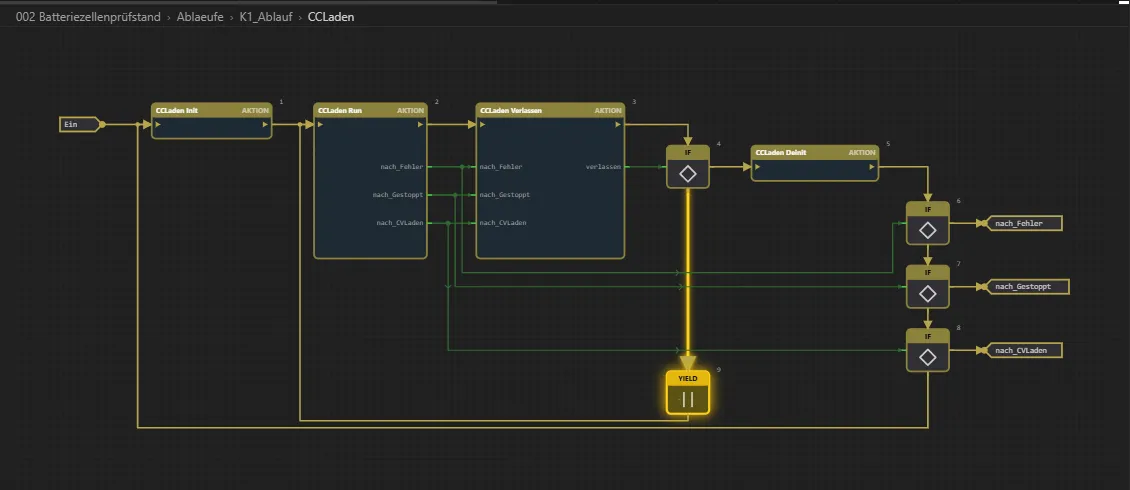
Flow chart of the state “CC charging” with actions, conditions and transitions; the step currently waiting is highlighted in yellow.
State “CC charging” of the test sequence in operation: the sequence waits in the highlighted step.

User interface

Dashboards that run on the device

User interfaces are designed in iCon-L.NOVA and run as a web page directly on the Q.station. The operator only needs a browser.

  • Pages with gauges, numbers, lamps, buttons, switches, sliders, tables and trend curves
  • Design and operation in the same view, next to the diagram
  • Displays and inputs are connected to the program via blocks
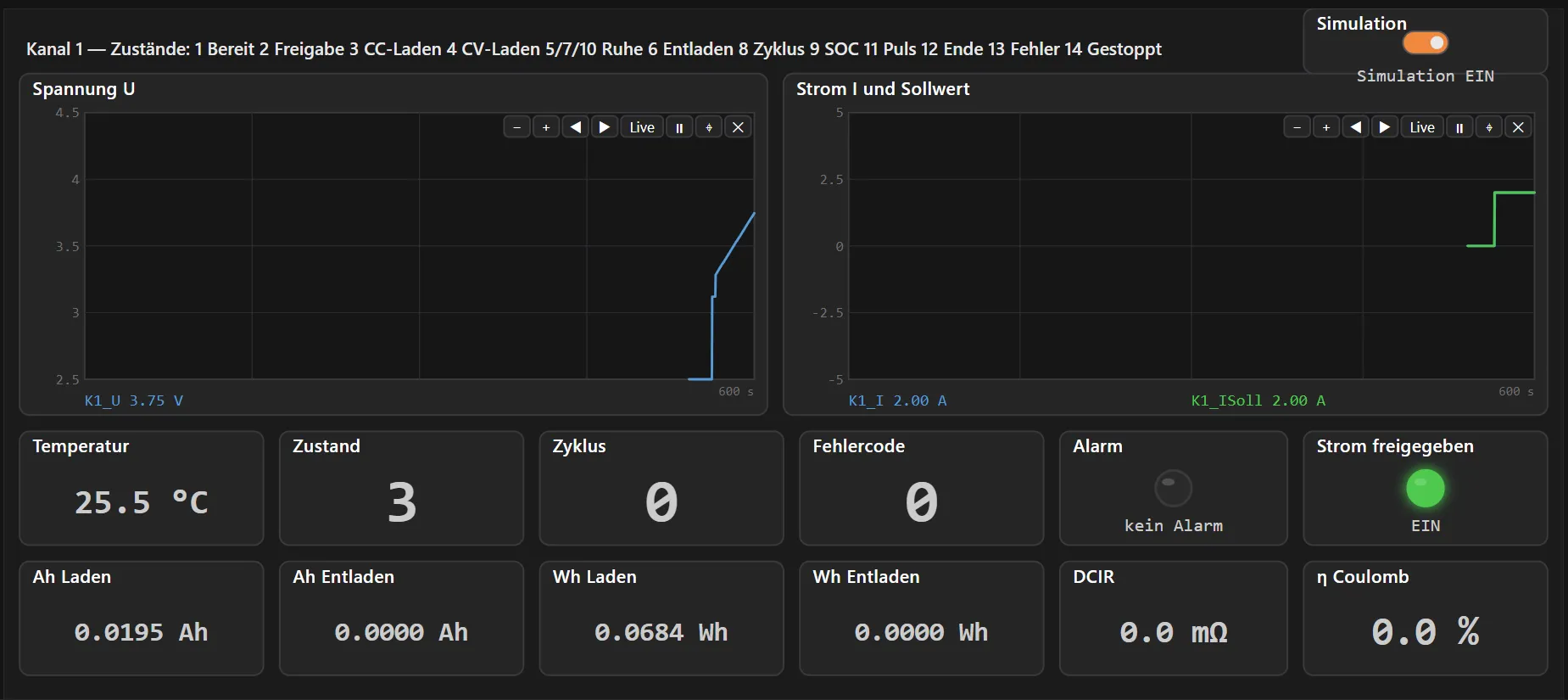
Dashboard “Kanal 1” with trend curves for voltage and current and tiles for temperature, state, cycle, error code and characteristic values.
Dashboard of the battery cell test bench while charging with constant current (captured 11 November 2026).

Documentation

Drawing frame and printing

Every level is a sheet as in electrical design: with frame, column references and title block. The frame can be shown in the editor and appears on every printed page.

  • Sheet sizes A4 and A3, portrait and landscape
  • Two templates: electrical drawing and a title block modelled on ISO 7200
  • Title block with project, sheet title, level path, sheet number, scale and print date
  • Project printout with cover sheet, table of contents, variable list and project documentation – on paper or as PDF
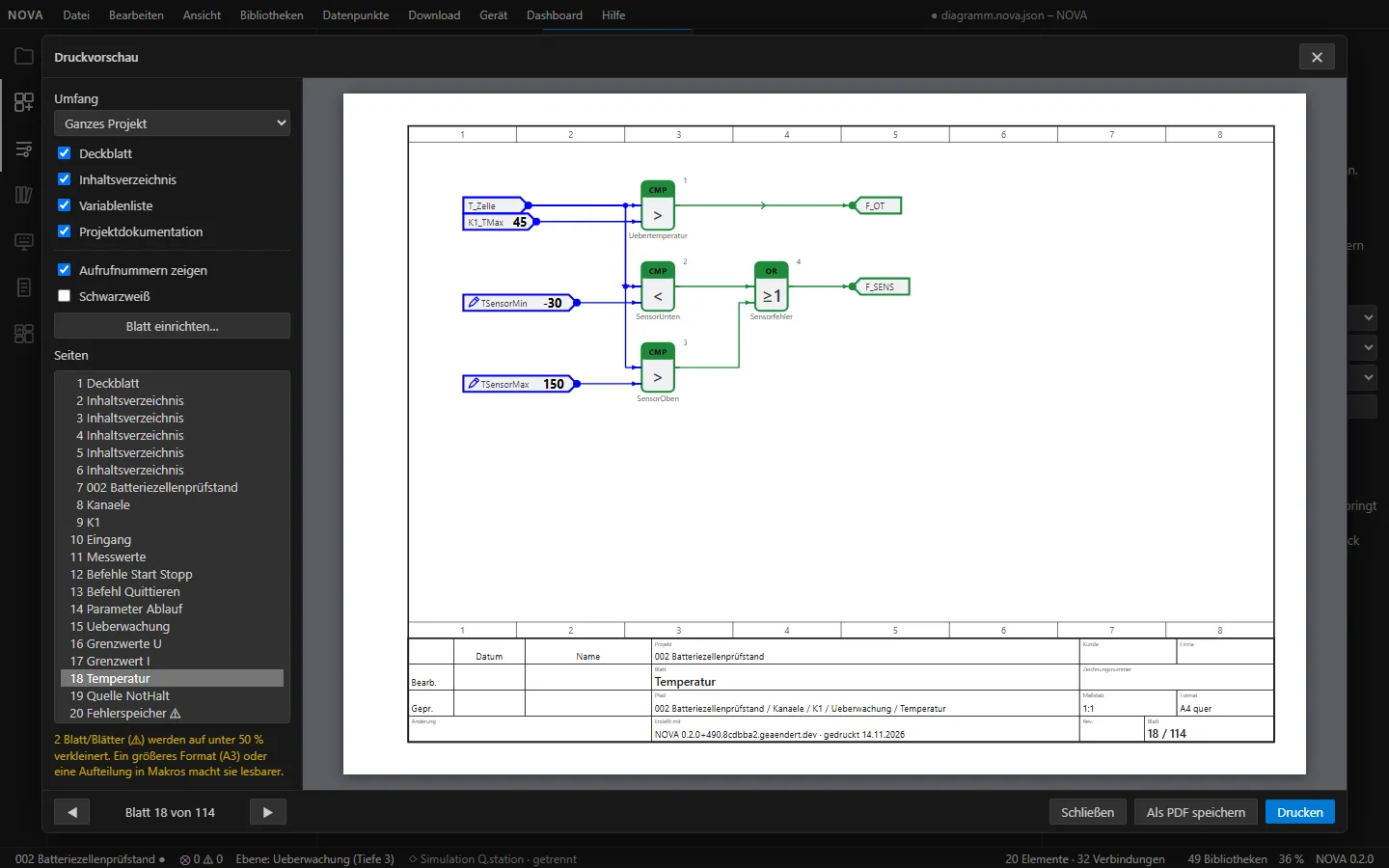
Print preview in iCon-L.NOVA: an A4 landscape sheet with frame, column references and title block containing the temperature monitoring as a block diagram; the page list of the project on the left.
Print preview of the battery cell test bench: sheet 18 of 114, level “Temperatur” (captured 14 November 2026).

Also included

  • Macros and links

    Define frequently used parts once and reuse them without copying.

  • Signal bus

    Combine many lines between macros into one bus line.

  • Drawing rules and guidelines

    Check at the push of a button, findings in the “Problems” view.

  • Curves and trends

    Curve generator for setpoint profiles, trend recorder for measurement series.

  • Inputs and outputs from the configuration

    The tool derives the inputs and outputs of a device from the hardware configuration.

  • Support package

    Everything needed to analyse a problem, in one file.

Libraries

49 libraries, around 270 blocks.

Blocks come from loadable libraries, grouped by subject in the palette. Libraries are data, not compiled code: custom blocks can be added without rebuilding the tool.

  • Logic

    Gates, edge detection, flip-flops, counters, shifting

    • LOGAND
    • LOGOR
    • LOGXOR
    • FFR
    • FFS
  • Arithmetic and numerics

    Basic arithmetic, functions, selection and comparison

    • ADDX
    • MULX
    • Sqrt
    • Sin
    • CMPRX
    • HYSTX
  • Vectors and matrices

    30 blocks from creation to matrix multiplication

    • VecCreate
    • MtxMul
    • VecSort
    • ScaProd
  • Control and signal processing

    Controllers, transfer elements, filters, signal generators

    • PIDA
    • PT1
    • DT1
    • FIR
    • GenSin
  • Time

    Timers, time and date, time arithmetic

    • TON
    • TOF
    • TP
    • RTC
  • Sequence control

    Flow charts, sequential function charts, debug and control

    • FCStart
    • FCStep
    • FCIf
    • Transition
  • Operation and display

    Displays and controls directly in the diagram

    • AnaMeter
    • BitLED
    • TrendWtr
    • Switch
    • Slider
  • Devices, I/O and communication

    Inputs and outputs, CAN, serial, XML-RPC, files

    • DIGIN
    • ANAIN
    • L2CANTX
    • RLLCREAD
    • LOAD
    • SAVE

In addition there are texts, variables and data points as well as the basic blocks for inputs and outputs, parameters and comments. Help for the selected block is shown in the properties view.

Views

The right view for every task.

Views can be docked, arranged and moved into separate windows. A selection:

Variables

All global variables with type, memory cell and live value. For each variable the view lists the places that write and read it.

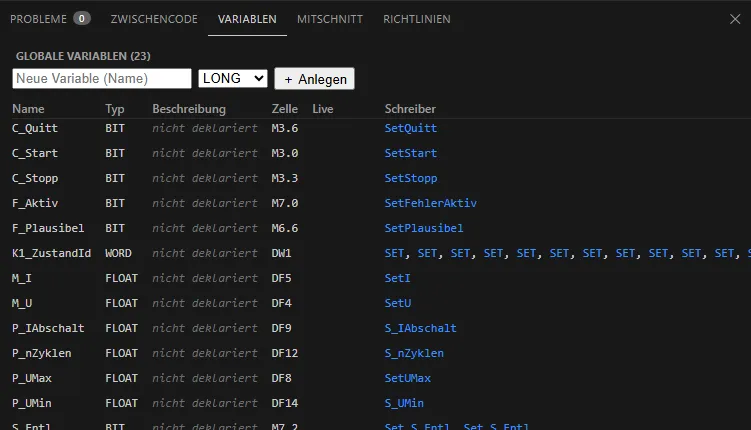
“Variables” view: table of global variables with name, type, cell and the writing blocks.
Variable list of the battery cell test bench with 23 global variables.
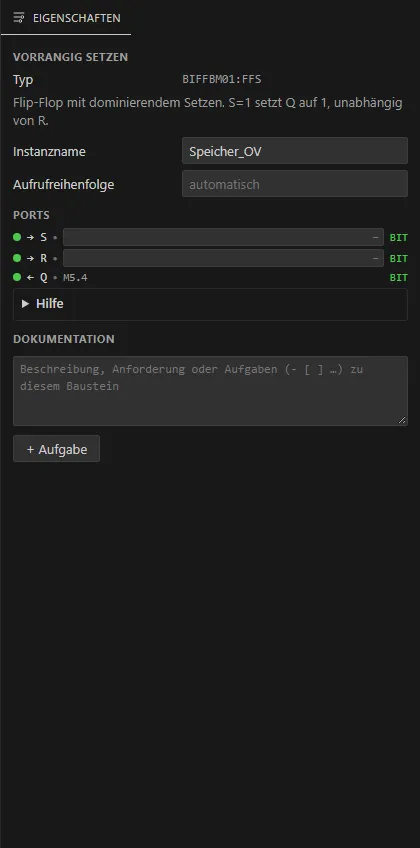
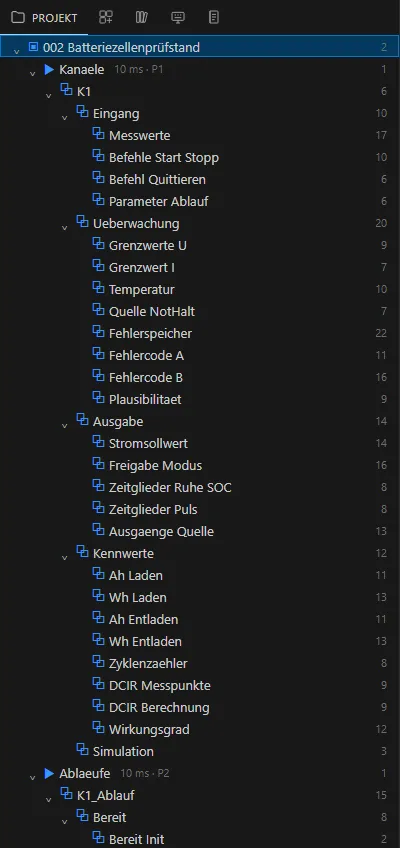
  • “Properties” view of a flip-flop with instance name, ports and documentation field.

    Properties

    Type, instance name, call order and ports of the selected block, plus help and documentation with tasks.

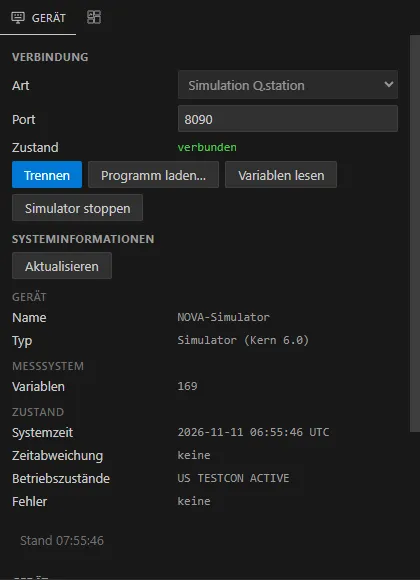
  • “Device” view: connection to the simulation, state “connected”, system information.

    Device

    Connect, download the program, read variables, start the simulator. Below: the system information of the device.

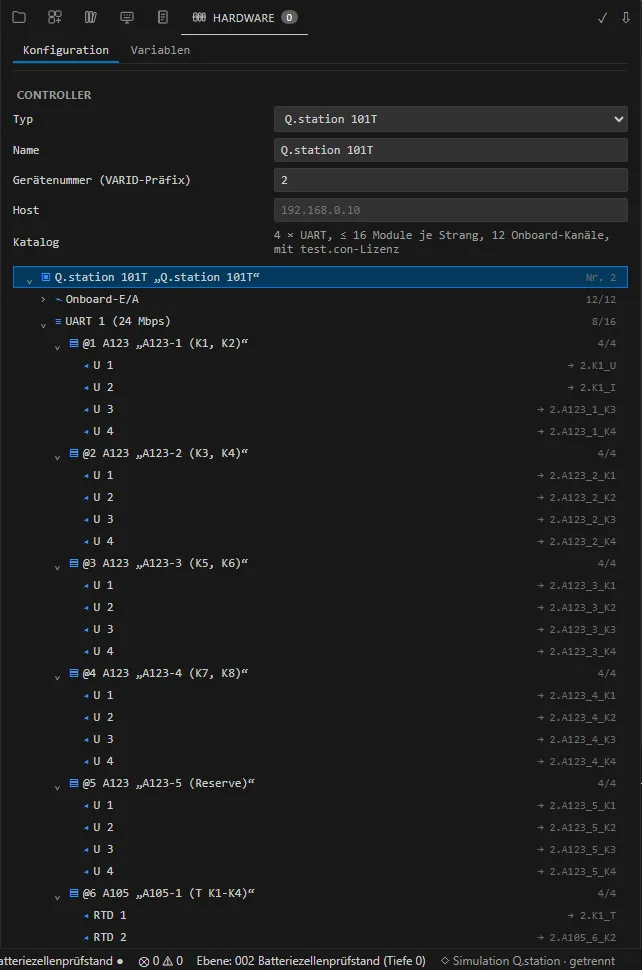
  • “Hardware” view: controller with modules and channels as a tree, with the assigned variables on the right.

    Hardware

    Configurator for controller, modules and channels. The device variables of the project are derived from the configuration.

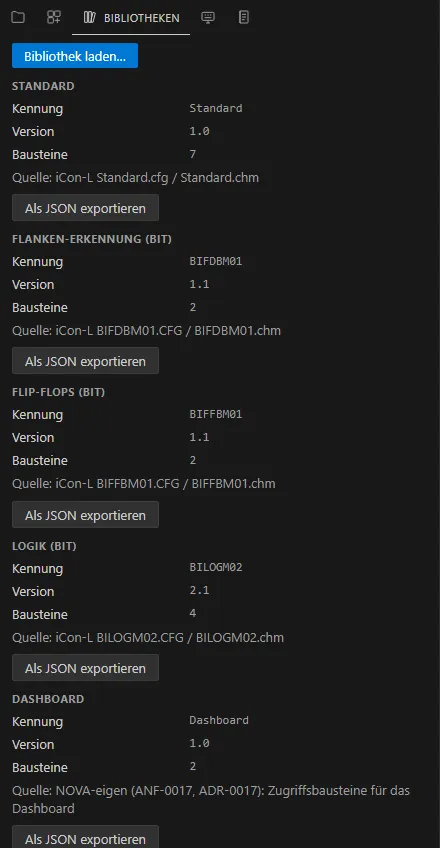
  • “Libraries” view: list of loaded libraries with identifier, version and number of blocks.

    Libraries

    Loaded libraries with identifier, version and number of blocks; more can be loaded from a file.

  • “Project” view: tree of program blocks, macros and sequences.

    Project

    The project tree with program blocks, macros and sequences – the structure of the model at a glance.

Further views: block palette, intermediate code, problems, guidelines, device communication trace and dashboard.

Contact

Get to know iCon-L.NOVA.

iCon-L.NOVA is a product of ProSign Process Design GmbH. Talk to us – if you would like to see the tool on a project of your own, or if iCon-L.NOVA should run on your controller.

Q.station, test.con, lococube, STG-850 and miCon-L are products of their respective manufacturers; all trademarks belong to their owners.

ProSign Process Design GmbH

Werner-Heisenberg-Straße 1
39106 Magdeburg